Complete Music Reading Trainer
- 4.6
- Rating
- 1.00M
- Installs
- Free
- Price
 Analysis by App-foxy
I found Complete Music Reading Trainer most useful when treated as a small practice station rather than a replacement for lessons. It is a free music game from Binary Guilt Software, built around reading notes and responding quickly. That simple focus makes it easy to pick up on a shared phone or tablet, especially when someone in the household wants a short exercise without opening a full lesson platform.
My first impression was that it asks for a different kind of attention from ordinary music apps. You are not mainly listening to songs or following a long course. You are training the connection between what you see and what you understand. That can feel satisfying after a few rounds, but it also means the value depends on regular practice. If you want entertainment first, this may feel more like homework than a game.
How it works in a shared household
A realistic use case is a family device left on a kitchen table. One person has a piano lesson later in the day, another is curious about reading music, and someone else only wants to try a quick challenge. Because the game is free to install and rated Everyone, it is approachable for a broad age range. I would still treat the age label as a starting point, not a guarantee that every child will enjoy the same level of difficulty.
You May Also Like

 Blood Strike: 2.5 Anniversary
Blood Strike’s Loadouts Turn Every Drop Into a Tactical Gamble
A close look at Blood Strike’s custom loadouts: how fast access to signature weapons reshapes its battle royale rhythm, rewards preparation, and narrows the gap between fights.

 Pandora - Music & Podcasts
Pandora’s Music Is Easy to Start, but Harder to Recover
Pandora’s strength is its low-effort path from a seed to a station. Its weak spot is how much confidence it asks you to place in connection, setup, and quiet recovery.

 8 Ball Pool
 Is Built on Rivalries, Rematches, and Routine
A close look at the rivalries, rematches, shared routines, and unanswered safety questions that turn a quick pool match into a persistent mobile community.

 Samsung Music
’s Quiet Strength Is Playing What You Already Own
Its reach comes less from spectacle than from dependable access to a personal library. That simplicity is both the app’s strongest retention engine and its ceiling.

 AccuWeather: Weather Radar
AccuWeather Review: A Quick, Clear Forecast for Everyday Decisions
For everyday plans, the best forecast is the one you can understand quickly. AccuWeather makes rain timing, radar, and local conditions easy to act on, with a few trade-offs.

 Hill Climb Racing
Why Hill Climb Racing Still Turns Crashes Into One More Run
A tiny car, a bumpy hill and one more upgrade: Hill Climb Racing keeps resurfacing because its simple chaos makes every near-miss feel personal.
More From Our News Desk



The strongest household benefit is that the practice is easy to explain. I can hand the device to another player and say that the goal is to recognize musical notation, then let that person discover the rhythm of the exercises. There is no need to coordinate a long session. A few minutes before school, after dinner, or while waiting for a lesson can be enough to make the app useful.
That convenience also exposes one of its limits: a shared-device session can become confusing if several people assume the app will keep their progress separate automatically. I would decide in advance who is practicing and when. If the device is passed around without a clear turn, a younger player may change the experience intended for a more advanced learner, or a beginner may feel discouraged by exercises chosen for someone else.
Why short sessions work better than forced practice
I get more from this kind of training when I stop before recognition becomes careless. The temptation is to keep playing after a good run, but speed-based reading can turn into random guessing when concentration drops. A short, focused session gives me a clearer sense of whether I am actually recognizing notes or merely reacting to familiar patterns.
For a household routine, I would give each player a simple turn: one person practices while the others leave the device alone, then the next person starts fresh. That arrangement is more effective than having several people call out answers together. Music reading is personal work; the quiet pause between seeing a note and identifying it is part of the skill.
Another useful approach is to connect the game with a real instrument. After practicing on the screen, I can sit at a keyboard or look at printed notation and test whether the recognition transfers. The app is strongest as a bridge between visual reading and practical study, not as proof that someone can play a complete piece fluently.
Setup, boundaries, and everyday coordination
Getting started is uncomplicated because the game is available at no upfront cost, although optional in-app purchases range from $0.99 to $9.99 per item. On a shared device, I would make sure the person responsible for purchases understands that free installation does not necessarily mean every optional item is free. That is a basic household boundary, but it matters more when children use the same phone or tablet.
I also recommend agreeing on a practice purpose before opening it. A beginner might need calm exposure to note names, while a more experienced player may want speed and accuracy. If everyone approaches the same session with a different goal, the household can mistake difficulty for a problem with the app. In my experience, the better question is whether the exercise matches the player’s current reading ability.
The developer is Binary Guilt Software, and the current version is 1.7.4-119 (121119). For a shared device, keeping the app updated is sensible, but I would not make an update the center of the routine. The important part is consistency: the same player should be able to return to the game and recognize what they are trying to improve.
Because the minimum operating system is Android 5.0, it can suit older compatible devices that are no longer used as someone’s main phone. That makes it practical for a household with a spare tablet or hand-me-down handset. The trade-off is that an older device may be less comfortable for reading notation if the screen is small, dim, or awkwardly positioned. I would test the display before deciding that the exercises themselves are too difficult.
Keeping progress and expectations separate
When several people share one screen, I would use a small notebook or a simple household routine to remember who practiced and what they noticed. I would not rely on everyone remembering the same personal target after a busy day. A child might be working on basic recognition, while an adult musician may be trying to reduce hesitation. Those are different forms of progress even if they use the same game.
This is also where trust matters. I would avoid turning the app into a scoreboard between siblings or partners. Comparing speed can be motivating for some players, but it can also encourage guessing and make a beginner avoid practice. The most useful comparison is with the player’s own earlier sessions: fewer pauses, fewer mistakes, or more confidence when looking at notation away from the screen.
For coordination, a shared calendar is unnecessary. A visible agreement such as “ten minutes after homework” is enough. The point is to make the app available without making it feel compulsory. If practice becomes a source of arguments, I would shorten the session or let the player choose another music activity. A reading trainer works best when attention is willing.
What the training feels like in practice
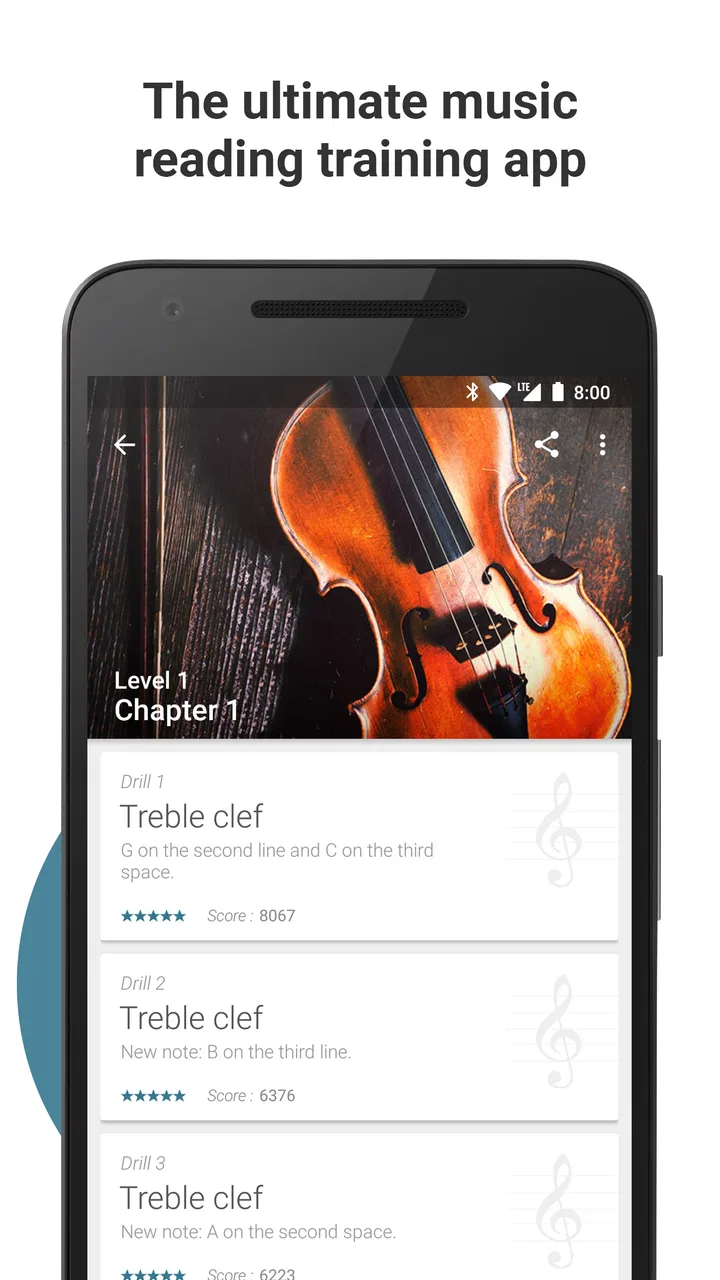
The game’s central strength is its narrow purpose. Many music-learning apps spread their attention across songs, theory lessons, instrument technique, ear training, and subscription courses. Complete Music Reading Trainer concentrates on reading. I appreciate that focus because it lets me work on a skill that is easy to neglect when I am eager to play actual music.
It is particularly helpful for the awkward stage when a learner knows that notes have names but still has to count lines and spaces one by one. Repeated visual prompts can make that recognition more immediate. I would use it before opening sheet music, because a few rounds can act as a mental warm-up. The benefit is not that the app teaches every part of musicianship; it is that it gives visual reading a dedicated place in the routine.
The game format adds pressure in a useful way, but pressure is not always the same as understanding. A player can become faster at answering the screen while remaining uncertain when notation appears in a real piece. To avoid that trap, I would alternate app practice with reading a beginner score, naming notes aloud, or locating them on an instrument. The best results come from using the game as a drill inside a wider music routine.
I also found that the app is better suited to deliberate repetition than casual browsing. With a streaming music service, I can relax and listen. With a lesson app, I may expect explanations and a clear curriculum. Here, I need to bring my own goal. That makes it flexible, but it also means a completely new learner may want guidance from a teacher, book, or course alongside it.
Useful habits for beginners and returning players
For a beginner, I would start slowly and say the note name before touching the answer. The extra moment may feel inefficient, but it helps separate recognition from reflex. Once the names become familiar, the player can work on reducing the pause. This two-stage approach is more useful than chasing speed immediately.
For someone returning to music after a long break, the game can be a low-pressure way to rebuild familiarity. I would not judge the first sessions harshly. Reading often feels rusty because the eyes and memory have not worked together recently. A short daily habit can be more productive than one long session at the weekend, particularly on a shared device where time is limited.
For a child, I would sit nearby at least at the beginning, not because the content is inappropriate, but because encouragement changes the experience. A child who makes mistakes may need help understanding that the exercise is training recognition, not testing musical worth. I would praise careful answers rather than only fast ones.
For an adult who already plays, the app may be most valuable as maintenance. It can expose hesitation that remains hidden when playing familiar songs from memory. However, experienced musicians should not expect it to replace sight-reading full passages, rhythm work, ear training, or technique practice. Its narrowness is both its identity and its boundary.
Age, trust, and the limits of a shared device
The Everyone content rating makes the game easier to consider for mixed-age households. Still, “suitable for everyone” does not mean every player will have the same needs. A small child may need an adult to explain notation, while a teenager may want more challenge than the basic exercises provide. An adult should set expectations instead of assuming the rating answers every practical parenting question.
I would also separate access from supervision. If a child uses a family tablet, the responsible adult should know whether optional purchases are allowed on that device and should explain the household rule before practice starts. The app’s free entry is convenient, but shared-device boundaries should come from the family, not from assumptions about how the store account behaves.
Trust is especially important if several people use one device. I would not ask a child to manage another person’s account, purchases, or personal practice records. Each player should know which session is theirs and whether the device is being used for study or leisure. That clarity prevents small misunderstandings from turning into disputes about who changed what.
There is also a social consideration. Music practice can be sensitive because people often compare their ability with relatives or friends. I would avoid announcing scores across the room unless everyone genuinely enjoys that competition. A shared household can support learning better by making the app a private tool that happens to live on a common device.
If the family needs detailed parental controls, multiple user profiles, teacher reporting, or a structured curriculum, I would look at a dedicated learning service instead. This game can support a routine, but it should not be mistaken for a complete household management system. In my view, that distinction is important before installing it for several learners.
Where it fits among music-learning alternatives
Compared with video lessons, this app offers more active recall and less explanation. A video can show how notation works, demonstrate a piece, and provide context, but it may let the viewer remain passive. The trainer asks for a response, which is better when the immediate problem is hesitation in identifying notes.
Compared with a full instrument-learning platform, it is lighter and more focused. A larger platform may guide a learner through songs, technique, rhythm, and theory in a planned sequence. That is the better option for someone who wants a complete path from first lesson to performance. I would choose this game instead when I already have lessons or an instrument routine and need extra reading practice without committing to another broad course.
Compared with flashcards or printed exercises, the game adds an interactive element and makes repetition less dull. Printed material can be easier to annotate and may show notation in more realistic musical context, though. I would use both: the app for quick recognition drills, printed music for transfer into actual reading.
Compared with simply playing songs by ear, the trainer addresses a different weakness. Ear-based playing can be rewarding and musically valuable, but it does not automatically build fluency with written notes. If the goal is to read sheet music more comfortably, this focused practice has a clearer purpose than another session spent only following familiar sounds.
Who should install it and who should skip it
I would recommend it to a beginner who wants a low-cost way to practice note recognition, a student who needs a warm-up before lessons, or a returning musician rebuilding basic fluency. It also makes sense for a household that already owns a compatible spare device and wants a simple music activity that different ages can try in short turns.
I would be more cautious for someone who expects a full course, instrument feedback, song tutorials, or teacher-style explanations. The app’s focus may feel too narrow if the player has no other source of musical instruction. I would also skip it as a primary tool for someone who dislikes timed or game-like practice, because the format can add pressure instead of motivation.
Another trade-off is that shared use requires household discipline. The game itself may be easy to open, but learning remains personal. Without clear turns and realistic goals, a family can turn a useful drill into a contest or a source of frustration. That is not a reason to avoid it; it is a reason to decide how the device will be used before several people begin.
My household verdict
Complete Music Reading Trainer has earned its place as a focused practice tool rather than a complete music school. Its free price makes trying it straightforward, and its 4.6 average from around 12 thousand ratings, alongside more than a million installs, suggests that many players find the approach worthwhile. I would treat those figures as signs of broad interest, not as a promise that every learner will enjoy the format.
The app is most convincing when I use it for a defined task: wake up note recognition, reduce hesitation, or add a few minutes of reading practice to an existing routine. It is less convincing when I ask it to explain all of music theory, teach an instrument, or organize several family members’ learning. Those jobs belong to other tools or to a teacher.
For a shared household, my recommendation is simple: choose one player at a time, agree on purchase boundaries, keep sessions short, and connect the screen exercises with real notation or an instrument. That approach respects both the app’s strengths and its limits. If your household wants a compact way to practice reading music without paying to begin, this is worth trying. Just make sure everyone understands that it is a drill, not a substitute for the wider experience of learning music.
FAQs for Complete Music Reading Trainer
01What is Complete Music Reading Trainer?
Complete Music Reading Trainer is an educational app designed to help users improve their music reading skills. It offers interactive exercises across various difficulty levels, catering to beginners and advanced musicians alike. With features like customizable practice sessions and progress tracking, it aims to enhance users' ability to read sheet music efficiently.
02Is Complete Music Reading Trainer suitable for beginners?
Yes, the app is suitable for beginners. It starts with basic exercises that gradually increase in complexity, allowing users to build their skills step by step. The app also provides helpful tutorials and tips, making it accessible to those who are new to music reading.
03What platforms support Complete Music Reading Trainer?
Complete Music Reading Trainer is available for both Android and iOS devices. This allows users to practice music reading on their smartphones or tablets, providing flexibility and convenience. Users can download it from Google Play Store or the Apple App Store.
04Does the app offer progress tracking?
Yes, Complete Music Reading Trainer includes a progress tracking feature. It records your practice history and provides feedback on performance, helping users to identify areas for improvement. This feature is beneficial for setting goals and monitoring advancement over time.
05Are there in-app purchases or subscriptions required?
Complete Music Reading Trainer offers a range of features for free, but there may be in-app purchases or subscription options available for additional content or advanced features. It’s advisable to check the app’s pricing details in the app store to understand what is included in the free version versus paid options.
Pros
- Comprehensive range of exercises.
- User-friendly interface design.
- Customizable practice sessions.
- Progress tracking with detailed stats.
- Supports multiple difficulty levels.
Cons
- Limited free content available.
- Occasional app performance lags.
- Ads in the free version.
- Requires internet for updates.
- No offline mode for some features.

Complete Music Reading Trainer
Gallery